
How to Get More Google Reviews in New Zealand: The Honest 2026 Guide for Small Businesses
12 November 2026 · By Top SEO Specialists
Ask every customer, the same day you finish the job, with a link that opens the review form in one tap. Most people say yes when asked: in BrightLocal’s 2026 survey, 83% of people who were asked left a review. The link is free, and the system is ask, make it easy, follow up once, and reply to every review.
Key Takeaways
✓ Most happy customers never leave a review because nobody asks. Asking is a system, not a talent.
✓ Ask every customer, the same day, with a direct link that opens the review form in one tap. Follow up once, then stop.
✓ In New Zealand most local businesses sit between 4 and 15 Google reviews. Reaching 30 puts you ahead of roughly 90% of your local competitors.
✓ Recent reviews matter more than an old total. Two reviews a week beats twenty reviews from two years ago.
✓ Never buy reviews, never offer a reward for one, and never ask only the customers you expect to be happy. Google removes them, and in New Zealand fake reviews can breach the Fair Trading Act.
How do I get more Google reviews? The short answer
Ask every customer, the same day you finish the job, with a link that opens the review form in one tap. Most people say yes when asked: in BrightLocal’s 2026 survey, 83% of people who were asked left a review. The link is free, and the system is ask, make it easy, follow up once, and reply to every review.
Four things move the number, in this order. First, get your direct review link from your Google Business Profile. Second, ask at the right moment, while the good experience is still fresh. Third, ask through the channel the customer already uses, text for a tradie, email for an online order, a QR card at the counter for a walk-in. Fourth, reply to every review you get, because replies are part of what makes the next customer leave one.
Two things never move the number in your favour: paying for reviews, and asking only the customers you expect to be happy. Both break Google’s rules, and both are covered in detail later in this guide.
Why reviews decide who gets the call
Reviews do two jobs at once. They help Google rank you higher on Maps, and they help a stranger pick you from the short list. No other single job is free, in your control, and working on both ranking and sales at the same time.
The numbers behind that are strong. BrightLocal’s Local Consumer Review Survey 2026 found that 41% of consumers always read reviews when looking for a local business, up from 29% the year before. And 74% only care about reviews written in the last three months, which means a good rating from 2023 does not carry you any more.
Google itself says local results rest mainly on relevance, distance, and prominence, and that review count and positive ratings feed into prominence. Your reviews are the part of prominence you can move yourself, one happy customer at a time. AI assistants such as ChatGPT and Gemini also draw on ratings and review sites when they recommend local businesses, so your review profile now shapes answers as well as search results.
Think about the moment that matters. Someone in Ponsonby searches for a plumber, and Google shows three businesses side by side. One has 34 reviews, the newest from last week, with replies from the owner. One has 3 reviews, the newest from 2023. One has none. The customer knows nothing else about any of them. The review count and the dates do the choosing.
If you want the profile, the reviews, and the local evidence handled together, our local SEO service covers it as part of the work.
How many Google reviews does a small business need?
There is no magic number, and anyone who gives you one is guessing, because Google has never published a target. What matters is how you compare with the three businesses above you in your area, and how recent your reviews are. A steady flow of new reviews matters more than a big total from years ago.
One NZ agency guide, FOUNDR AI, puts the New Zealand picture this way: most local businesses have between 4 and 15 Google reviews, and getting to 30 or more puts you ahead of roughly 90% of your local competitors. That is the bar in most New Zealand towns and suburbs, and it is genuinely low. A consistent review habit over three to four months can move you across it.
Use this ladder to see where you sit, and what to do next.
| Reviews | Where you sit in New Zealand | What to do next |
|---|---|---|
| 0 to 3 | Invisible. Most searchers skip you without a second thought. | Get your first 10 from recent jobs, starting this week. |
| 4 to 15 | Typical. This is where most NZ local businesses sit. | Ask after every job until you pass 15. |
| 16 to 29 | Ahead of most local competitors in your area. | Keep the flow going and reply to every review. |
| 30 or more | Ahead of roughly 90% of local competitors. | Protect the lead. Keep asking, and watch your velocity. |
Two rules sit behind the ladder. First, compare yourself with your own patch, not with a national chain. Open Google Maps, search your main service plus your suburb, and write down the review counts of the top three businesses. Your first target is to match the third one, not to reach a thousand. Second, watch velocity, not just the total. A business that gets two reviews a week looks more relevant and trustworthy to Google than one that got twenty reviews two years ago and nothing since.
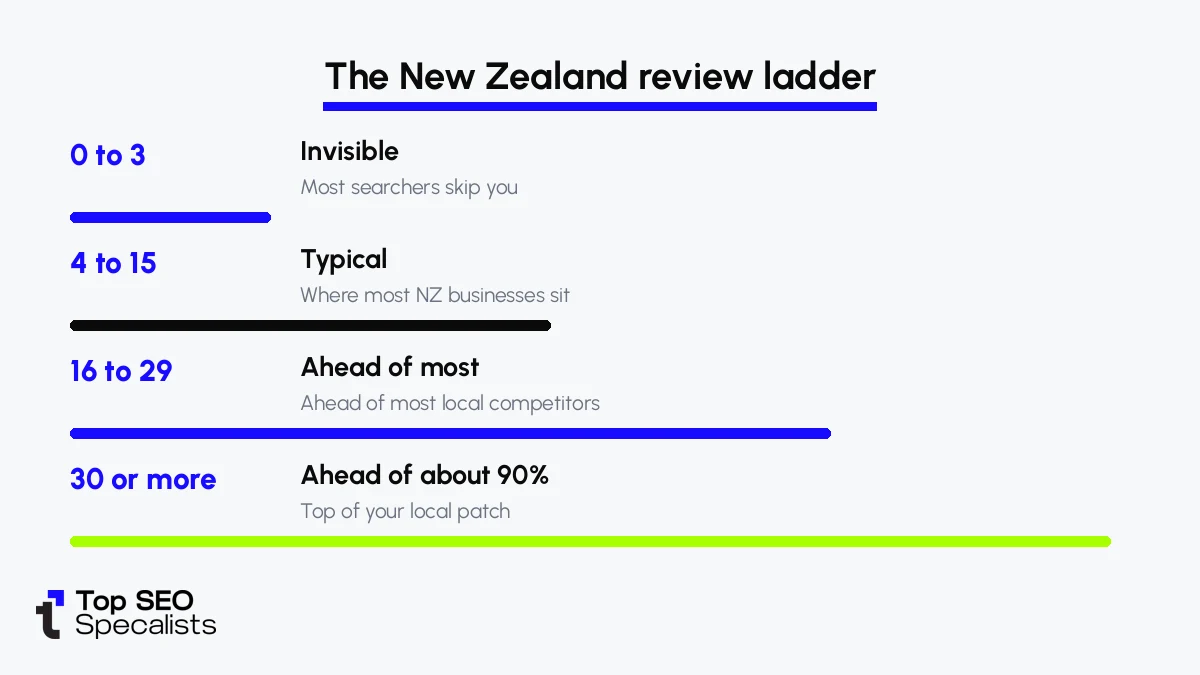
The New Zealand review ladder. Most local businesses sit between 4 and 15 reviews. Thirty puts you ahead of roughly 90% of your local competitors.
How do I get my Google review link?
Your Google review link is the single most useful thing in this guide, and most owners have never seen it. It opens the review form directly, with the stars ready to tap, so the customer never has to search for your business or work out where to click.
Getting it takes about a minute, on a computer. Sign in to your Google Business Profile, either in Google Search or Maps while signed in, or in the Business Profile Manager. Open your reviews, then choose the option labelled “Ask for reviews” or “Get more reviews”. Google gives you a short link to copy, and a QR code to download. One detail worth knowing: the QR code is only generated in a computer browser, not on a phone, so do this step at your desk.
Once you have the link, save it where you can reach it in seconds. Put it in your phone notes, in your email signature, at the bottom of your invoices, and in a WhatsApp Business quick reply if you use WhatsApp with customers. The link is free, the QR code is free, and every place you put it is one less step between a happy customer and a review.
If you cannot find the option, check first that your profile is verified and that you are signed in as the owner or a manager. An unverified profile cannot collect reviews, and a staff member signed in on a personal account will not see the business tools.
When is the best time to ask for a Google review?
The best time is right after a good experience, while the customer still feels it. A week later the feeling has faded and the ask feels like admin. The same ask, sent the same day, gets answered. Sent on Friday for a job done on Monday, it gets ignored.
These are the moments that work best for New Zealand small businesses. At the handover, when the meal arrives, the haircut is revealed, or the keys come back. Straight after the job is finished, while you are still on site and the customer is thanking you. In a text message within two hours of the job, which is the timing one NZ agency guide recommends. When the customer thanks you by text or email, which is a natural opening. And after a problem is fixed well, because a customer whose complaint was handled properly often writes the most convincing review you will ever get.
One limit matters. Google’s policy says you may not require customers to leave a review while they are on your premises, and you may not ask for specific content in it. You can ask in person, and you can hand over a card with a QR code, but the customer must be free to leave the review later, in their own words, or not at all. Standing over someone while they tap stars is not asking, it is pressure, and it is the fastest way to get a review Google later removes.
What should I say when asking for a Google review?
Keep it short, personal, and honest. Two sentences are enough. Use the customer’s name, mention what you did for them, and include the link. Never ask for five stars, and never write “if you loved us”. Ask for an honest review, and let the customer say what they really think.
Here are four templates you can copy. Replace the brackets and send them as they are.
Text message, same day: “Hi [first name], thanks for choosing [business] today. If you have a minute, an honest Google review would really help us: [link]. Thanks, [your name]”
Text follow-up, next day, only if they have not replied: “Hi [first name], just a quick follow-up on yesterday. If you got a moment, here is the link again: [link]. No worries at all if not. Thanks, [your name]”
Email, subject line How did we do, [first name]? “Thanks again for choosing [business] for [service]. If you were happy with the result, would you mind leaving us a short Google review? It takes less than a minute: [link]. Your feedback helps us improve, and it helps other people find a business they can trust.”
In person, at the end of the job: “If you were happy with everything today, a short Google review would mean a lot to us. I can text you the link so it takes ten seconds.”
Three rules sit behind all four templates. Ask for an honest review, never for a star rating. Keep it to two sentences, because a long message reads like a chore and gets put off. And mention the job, because “thanks for the bathroom renovation” gets a review and “thanks for your custom” gets forgotten.
Which way of asking works best?
No single channel wins for every business. The right channel is the one your customer already uses to deal with you. A text works for a tradie whose customers book by phone. An email works for an online store. A QR card works for a cafe where people pay at the counter. Match the channel, and the response follows.
| Way of asking | Best for | Effort | Response |
|---|---|---|---|
| Ask in person, then text the link | Tradies, salons, clinics, cafes | Low | Highest |
| Text or SMS after the job | Any service business | Low | High |
| Email after the job | Online orders, professional services | Low | Medium |
| QR card at the counter or on the receipt | Walk-ins, retail, cafes, restaurants | One-off setup | Medium |
| Link on the invoice | Every job, every customer | None, once set up | Low to medium |
| Reviews shown on your website | Visitors weighing you up | One-off setup | Low |
Two things are true of every row. First, the link does the heavy lifting, not the channel. A customer who has to search for your business name will give up, whatever channel you used. Second, asking once is not a system. The businesses with the most reviews ask after every job, every time, as part of the job itself. When asking becomes part of finishing the work, the count grows without anyone having to remember it.
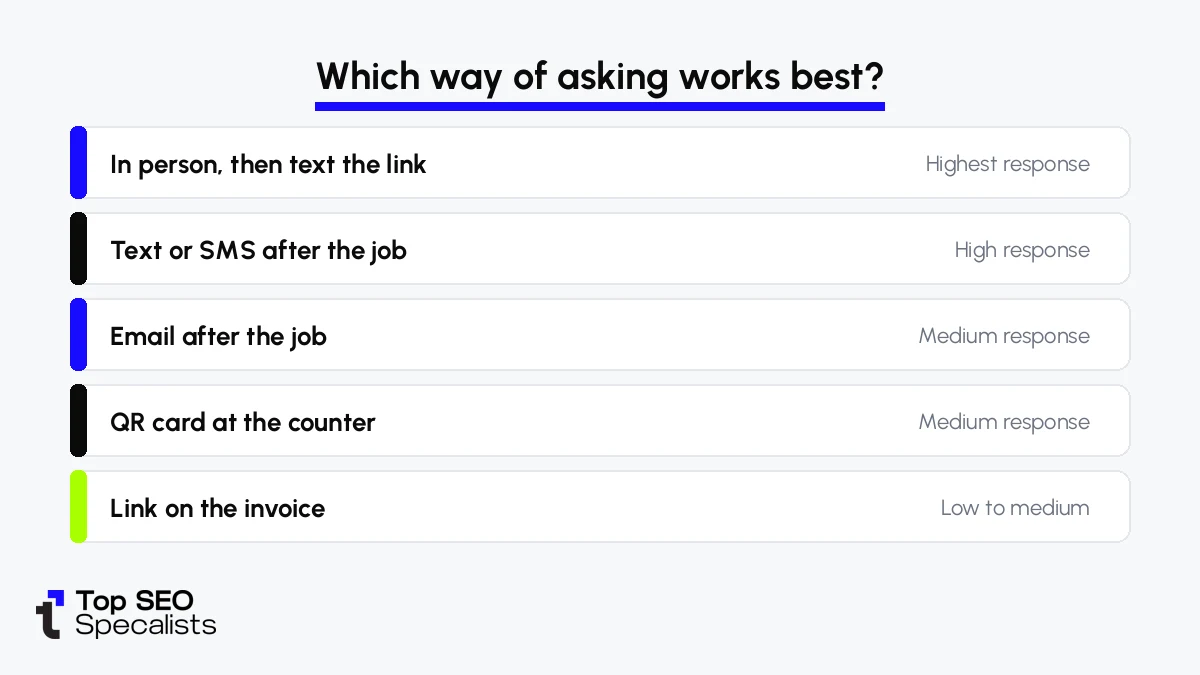
Which way of asking works best? Match the channel to how the customer already deals with you.
Can I automate Google review requests?
Yes, as long as every customer gets the request. Automation is allowed, and it is the only way most busy owners keep the habit going. What automation must never do is filter: sending the link only to happy customers is review gating, and Google prohibits it.
A simple automated flow looks like this. The job is marked complete, or the invoice is paid, or the order is delivered. Two hours later, the customer gets a short text and an email with the review link. If there is no review after three days, one reminder goes out. Then it stops, forever, for that customer. Replies are watched, so a negative review alerts the owner within the hour and a real person can call the customer back.
The free route costs nothing but your time: the review link and QR code come free from Google, and a manual text after each job works perfectly well for a business doing a handful of jobs a week. Paid review software starts low. Opside, a New Zealand provider, lists its Review Funnel add-on at $29 a month, and you should check whether GST is included before you sign up. Prices vary, and the dearest tool is not the best one. The one that asks every customer, on time, every time, is the best one.
One warning before you automate anything. Do not give staff a target number of reviews, and do not reward them per review. Google lists asking staff to solicit a certain number of reviews as prohibited behaviour. Train the team on when and how to ask, and let the system do the counting.
What are the rules? What Google and New Zealand law do not allow
Google allows you to ask customers for reviews. It actively encourages it. What it does not allow is a short list, and it is worth knowing clearly, because breaking it can get reviews removed or your profile restricted.
Do not buy reviews, or pay anyone to post them, including agencies that promise a number of five-star ratings. Do not offer discounts, freebies, gift cards, prize draws, or loyalty points in exchange for a review, positive or negative. Do not ask only the customers you expect to be happy, and do not discourage unhappy customers from reviewing. Do not write reviews yourself, and do not ask staff, friends, or family to post them. Do not require a customer to leave a review while on your premises, and do not ask for specific content in a review. Do not set staff targets for review numbers.
In New Zealand there is a second layer. Fake or misleading reviews can breach the Fair Trading Act, which prohibits misleading conduct in trade, and the Commerce Commission has published guidance for businesses on online reviews. The United States has its own rule, the FTC rule on consumer reviews in effect since October 2024, but that is American law, not New Zealand law. What applies here is Google’s policy and the Fair Trading Act, and both point the same way.
If Google detects fake engagement, it can remove the reviews, restrict your profile, temporarily block new reviews, unpublish your existing reviews, or display a public warning to users that fake reviews were found. That warning sits on your profile for every future customer to see. No shortcut is worth it.
How do I reply to Google reviews?
Reply to every review, good and bad, and reply quickly. In BrightLocal’s 2026 survey, 80% of consumers said they are likely to use a business that responds to all of its reviews, and 81% expect a reply within a week. Aim for 24 to 48 hours, because future customers read your replies as much as the reviews themselves.
A thoughtful reply to a one-star review can build more trust than another five-star review.
For a good review, thank the person by name and mention the job. “Thanks, Sarah, glad the heat pump install went smoothly. Enjoy the warm house.” That takes twenty seconds, and it tells the next reader that a real person runs this business.
For a bad review, stay calm and professional, even if the review is unfair. Thank them for the feedback, acknowledge the issue without getting defensive, and offer to sort it out offline with a phone number. “Thanks for letting us know, James. I am sorry the wait was longer than expected on Saturday. I would like to sort this out for you, please call me on [number].” Never argue in public. Potential customers are reading your response, not the original review, and an argument tells them more about you than the complaint ever could.
If a review mentions a staff member by name, thank the staff member too, but do not turn replies into a performance review. And if a review is detailed and specific, quote a little of it back. It shows you actually read it.
How do I get a bad Google review removed?
You can only get a review removed if it breaks Google’s policies. A negative review from a real customer stays, even if you disagree with it. What Google will remove is spam, a fake review from someone who was never a customer, a review from a competitor or an ex-employee, a review with illegal content, or one that is off-topic.
To report one, open the review in your Business Profile, flag it, and explain briefly why it breaks the policy. Be specific: “this reviewer was never a customer, we have no record of this job” is useful, “this review is unfair” is not. Google reviews the report and decides. It can take days, and you will not always get the answer you want.
If the review stays, reply well and move on. One honest bad review sitting among thirty good ones does not hurt you. It makes the good ones believable. What hurts is a bad review with no reply, sitting at the top of an empty profile. Keep earning genuine reviews, and the mix fixes itself.
Never pay a service that promises to remove bad reviews. No one outside Google can remove a review, and the services that claim they can are selling either fake reports or fake replacement reviews, both of which put your profile at risk.
Do Google reviews help SEO?
Yes. Reviews are one of the top three ranking factors for local search, and they are the thing customers trust most when they are choosing between two similar businesses. Google says local ranking rests mainly on relevance, distance, and prominence, and review count and positive ratings feed into prominence. That is the part of the ranking you can move yourself.
Recency matters as much as count. Google looks at how consistently reviews arrive, and 74% of consumers in BrightLocal’s 2026 survey only care about reviews written in the last three months. A steady flow of new reviews tells Google the business is active and trusted right now, not three years ago.
Review text helps too. When customers mention the service and the suburb in their own words, “great heat pump install in Hamilton” or “best flat white in Ponsonby”, those words add relevance to your profile for those searches. You cannot ask customers to write specific content, and you should not try, but genuine reviews naturally include the words future customers search for.
One honest limit: reviews alone do not put you in the map pack. Your profile must be verified, complete, and in the right category first. Reviews are the fuel, not the engine. If your profile is half finished or your category is wrong, fix that before you chase review numbers. Our Google Maps SEO guide explains the profile side in detail.
Reviews are one part of the picture. Our local SEO service covers the profile, the reviews, and the local evidence together.
Your first 14 days: the review plan
You do not need software, a budget, or a consultant to start. You need a link, a list of recent jobs, and fourteen days of asking. Here is the plan, written for a business starting from a low count.
✓ Days 1 to 2: get the link. Claim and verify your Google Business Profile if you have not already. Copy your review link and download the QR code on a computer. Save the link in your phone notes, your email signature, and at the bottom of your invoice template.
✓ Days 3 to 4: make your list. Write down your last twenty customers, the ones you can still contact. Note the job and the date for each one. These are your first asks, and they are the easiest reviews you will ever get.
✓ Days 5 to 7: ask your recent customers. Text five of them a day, using the template above, personalised with their name and job. Do not text all twenty at once. A sudden burst of reviews in one day looks odd to Google, and a steady flow looks natural.
✓ Days 8 to 14: ask after every job. From now on, the ask is part of finishing the job. In person at the handover, then a text the same day if they have not reviewed yet. One follow-up the next day, then stop.
✓ Every day: reply as reviews arrive. Thank each reviewer by name and mention the job. If a bad review lands, reply calmly and offer to fix it offline.
✓ Day 14: count and compare. Write down your new total, your new average rating, and how many reviews arrived in the last two weeks. Then search your main service plus your suburb on Google Maps and write down the top three counts again. That is your new baseline, and the gap is your next target.
Ten reviews in fourteen days is a realistic goal for most small businesses with a real customer list. Some will take longer, and that is fine. The habit matters more than the fortnight. A business that asks after every job will pass thirty reviews inside a few months, and in most New Zealand towns that puts it ahead of roughly 90% of its local competitors.
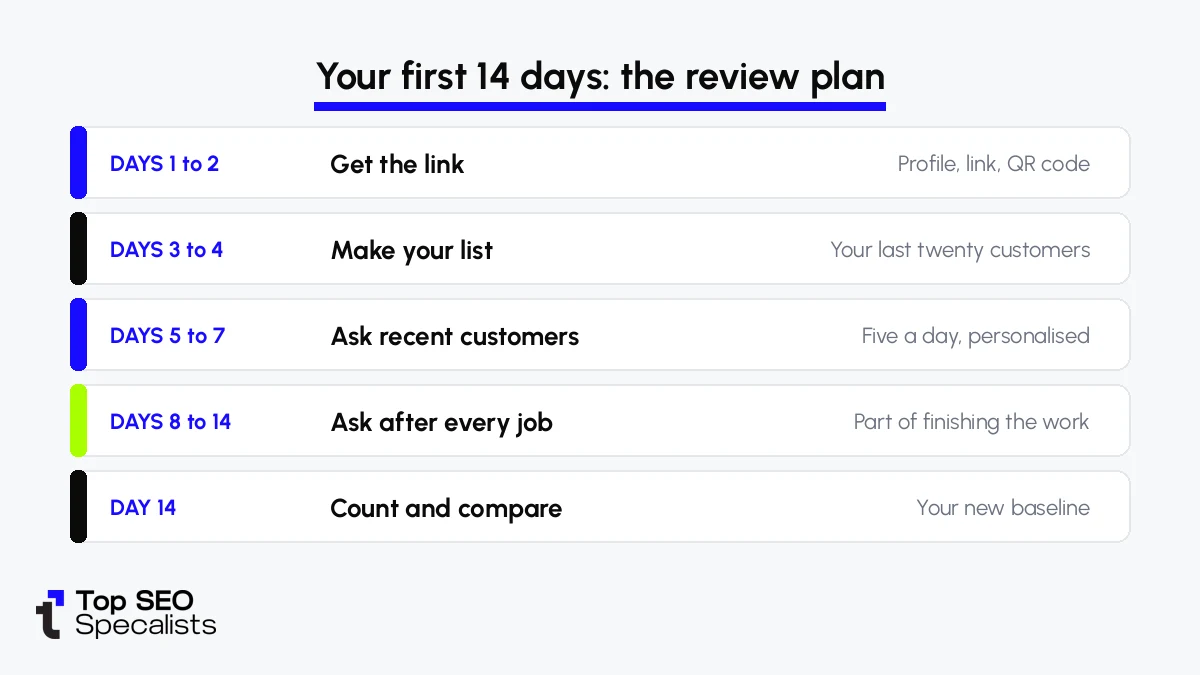
Your first 14 days. Get the link, list your recent customers, ask five a day, then ask after every job.
Frequently asked questions
Ask every customer on the same day you finish the job, with a link that opens the review form in one tap. Most people say yes when asked: in BrightLocal’s 2026 survey, 83% of people who were asked left a review. Follow up once the next day, then stop, and reply to every review you get.
There is no magic number, and Google has never published a target. Compare yourself with the top three businesses for your main service in your area, and aim to match the third one. In New Zealand most local businesses sit between 4 and 15 reviews, and reaching 30 puts you ahead of roughly 90% of local competitors.
Sign in to your Google Business Profile on a computer, open your reviews, and choose “Ask for reviews” or “Get more reviews”. Google gives you a short link to copy and a QR code to download. The QR code is only generated in a computer browser, not on a phone, so do this step at your desk.
No. Buying reviews breaks Google’s policies, and Google can remove the reviews and restrict your profile. Fake or misleading reviews can also breach the Fair Trading Act in New Zealand, and the Commerce Commission has published guidance on online reviews. Earn reviews by asking real customers instead.
Usually within minutes to a few hours, and sometimes a day or two. If a genuine review never appears, Google may have filtered it, or the reviewer may not have finished submitting it. Ask the customer to check whether their review is visible on your profile, and do not ask them to post it again.
The review link and QR code are free from your Google Business Profile, and asking costs nothing but a minute of your time. Text the link to customers after each job, add it to your invoices and email signature, and put a QR card at the counter. Paid software only saves you the remembering, not the asking.
Yes, to all of them, good and bad, ideally within 24 to 48 hours. In BrightLocal’s 2026 survey, 80% of consumers said they are likely to use a business that responds to all of its reviews. Thank good reviewers by name and mention the job, and reply calmly to bad reviews with an offer to fix it offline.
Google removes reviews that break its policies, such as fake reviews, paid reviews, or reviews from people with a conflict of interest. If many of your reviews disappear at once, check whether they were genuine and whether your asking followed the rules. Reviews that were bought or gated are removed, and repeat problems can restrict your profile.
What to do next
Getting more Google reviews is not a trick and not a purchase. It is a habit: ask every customer, the same day, with a link that opens the form in one tap, follow up once, and reply to every review. In most New Zealand towns that habit alone puts you ahead of roughly 90% of your local competitors within a few months, because most of them never ask at all.
If you want an honest read on where your business sits, start with a free audit. We will look at your profile, your review count, and your starting position, and tell you what should move first.
Want more reviews and more calls from Google?
Tell us where your business sits and we will look at your profile, your review count, and your starting position, and tell you what should move first.
Keep reading
The Map Pack side, in detail.
How long the whole job takes, month by month.
The service that does this work.