
Blog / SEO
Google Maps SEO: What It Is and How to Rank Higher in New Zealand in 2026
29 October 2026 · By Top SEO Specialists
Google Maps SEO is the work of optimising your Google Business Profile and your local signals so your business appears in the Map Pack, the top three map results Google shows for local searches. In New Zealand, it decides whether nearby customers find you or your competitor when they search for what you do.
Key Takeaways
✓ Google Maps SEO is real, and it is different from website SEO: it is won on your Google Business Profile, not on your website alone.
✓ Google ranks Maps results on three things: relevance, distance and prominence.
✓ The most common problem is not one problem: showing by your business name but not for your services is a ranking problem, while not showing by name at all is usually a verification or suspension problem. The fix is different for each.
✓ The foundation is a complete, accurate profile, the right primary category, steady genuine reviews, identical business details everywhere, and real photos.
✓ Maps SEO is ongoing work, not a one-time setup. Details drift, reviews go unmanaged, and competitors keep working.
✓ Your Business Profile itself is free. What it costs is time, or paying someone for that time.
What is Google Maps SEO?
Google Maps SEO means optimising your business listing so it ranks higher in Google Maps and in the Local Pack, the box of three map results at the top of a local search. When someone in Auckland searches “plumber near me” or “electrician North Shore”, the businesses in that box get the calls. Businesses outside it mostly do not.
It is different from traditional SEO. Traditional SEO ranks your website in the organic results. Google Maps SEO ranks your Google Business Profile, the free listing formerly called Google My Business. Your website supports it, but it does not replace it. If your profile is inaccurate or incomplete, no amount of website work compensates.
It is also different from local SEO in general. Local SEO is the wider discipline: your website’s local content, your location pages, your citations and your profile working together. Google Maps SEO is the Maps half of that work, centred on the profile itself.
And yes, there is SEO for Google Maps. It is not a trick and it is not paid placement. Google states there is no way to request or pay for a better local ranking. Ads, including Local Services Ads, sit in their own section and do not change your position in the regular map results.
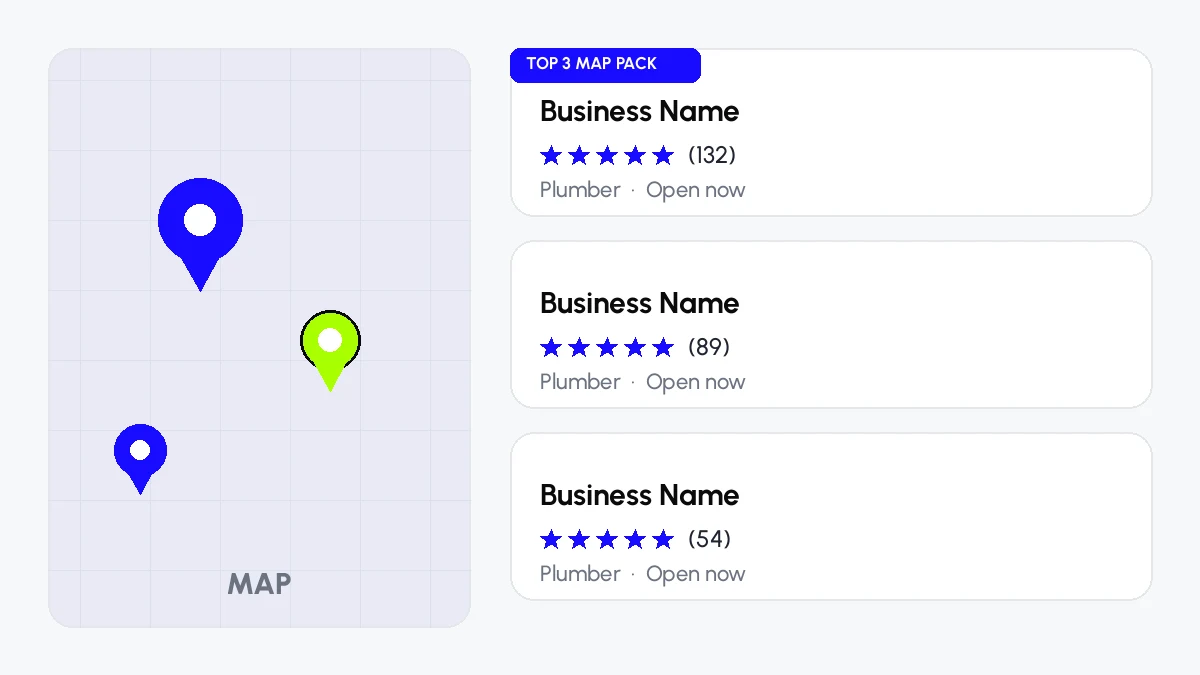
The Map Pack: the three businesses Google shows first for a local search.
How does Google decide who ranks on Maps?
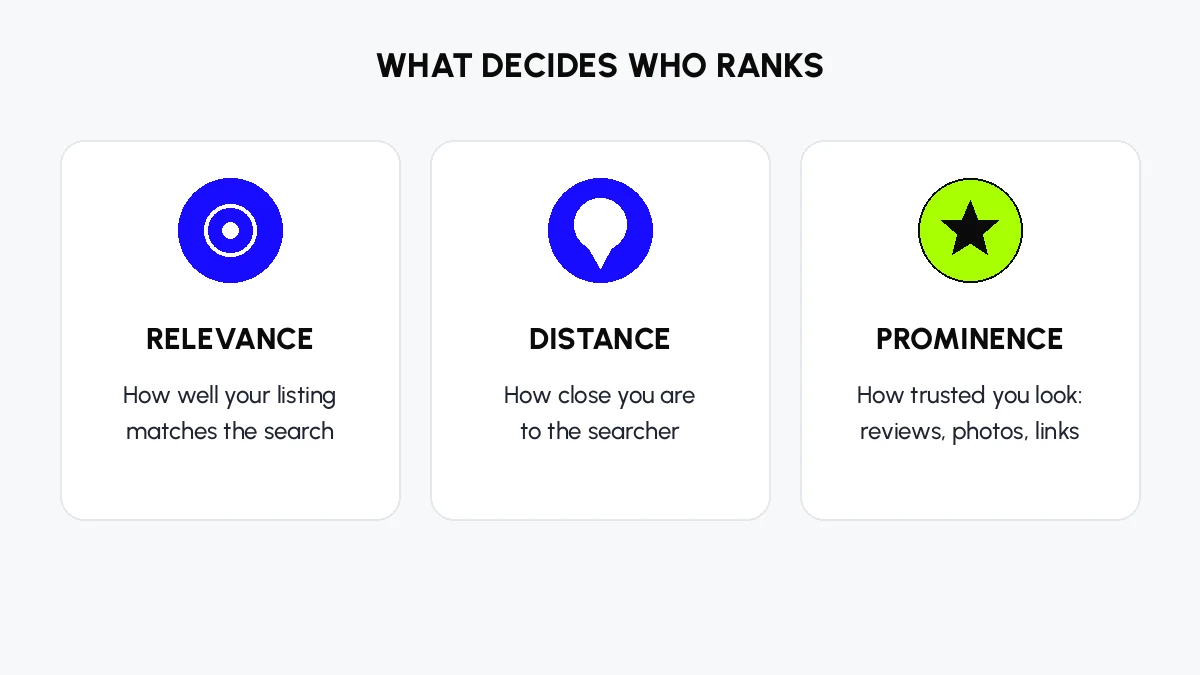
Relevance, distance and prominence: the three factors behind every Map Pack ranking.
Why is my business not showing on Google Maps?
Start with a two-minute test. Search Google Maps for your exact business name and your city. Then search for your service and your city, for example “plumber Hamilton”.
If you cannot find yourself by name, you have a visibility problem. Check in this order: does a profile exist and do you control it, is it verified or is verification still pending, is it suspended, disabled or restricted, and does the business, address, pin and name follow Google’s guidelines. A new business can take up to a month to appear, and profile edits can take up to three days to surface, so a technically live profile can be practically invisible for a while. Never create a second profile to get around a suspension or a lost login. Google says duplicates will not show.
If you appear by name but not for your service, you have a ranking problem, not a disappearance. Your listing exists, but it is not competing well enough for discovery searches yet. That feels like disappearance, but the fix is different: better profile accuracy, stronger local proof and more consistent upkeep, not a state check.
This distinction matters because most advice treats both problems the same way. They are not the same problem, and they do not share a fix.
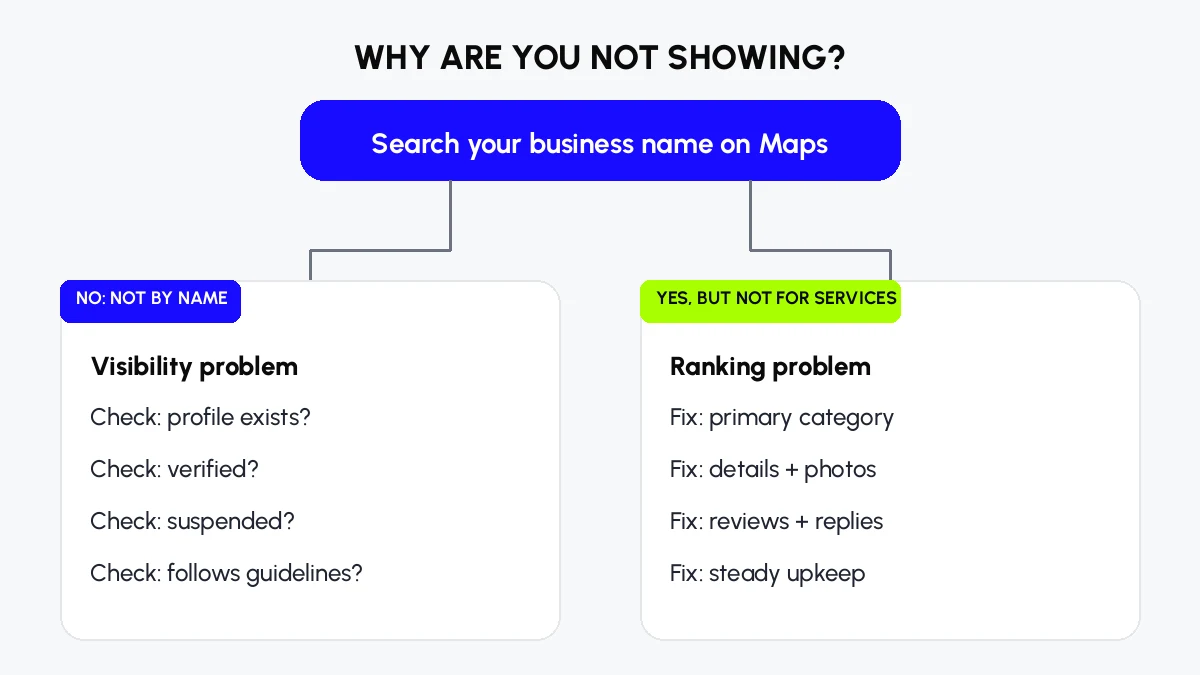
Two different problems, two different fixes. Find out which one you have first.
How to improve Google Maps SEO: the foundation
Work through this in order. Each step builds on the one before it.
1. Claim and verify your Google Business Profile
Claim the profile and complete verification. Google offers verification by phone, email, video or mailed postcard depending on the business, and the postcard typically takes 5 to 14 days. Verification trouble is one of the most common pain points owners report, and it is worth doing carefully rather than rushing: a failed verification attempt costs more time than a careful first attempt.
2. Get the primary category right
Your primary category is one of the strongest ranking signals there is. Pick the one that matches what your customers actually type, not the broadest or most flattering label. “Lawyer” and “family law attorney” rank for different searches. Add secondary categories only for services you genuinely provide. Mixing in unrelated categories risks suspension and dilutes relevance.
3. Complete every field, accurately
Fill in your business name (your real name, exactly as it appears on your shopfront and website), address or service area, local-area-code phone number, website, hours including holiday hours, services, attributes and opening date. Write a natural description of what you do in the 750 characters allowed, using the words customers use, without stuffing keywords into your business name. Name-stuffing is against Google’s guidelines and can get a profile suspended, even when competitors appear to get away with it. The right response to a rule-breaking competitor is to report them with evidence, not to copy them.
For New Zealand service-area businesses, such as a plumber who visits customers, define your service areas honestly instead of forcing a physical address you do not serve customers from. Google allows eligible businesses to represent their real service model without a storefront pin. Hiding your address does not automatically mean your listing is broken.
4. Use real photos, and keep them fresh
Upload real photos of your premises, vehicles, team and completed work. Stock photos do not build trust, and a profile with a blurry logo from years ago looks abandoned. Photos of actual work also help customers choose you once they find you, which is half the job.
5. Make your details identical everywhere
Your name, address and phone number must match exactly across your website, your profile and every directory, including minor details like suite numbers and abbreviations. Google cross-references these signals to judge how confident it can be in your data. In New Zealand, start with the directories customers and Google both check: Yellow, Neighbourly, Localist and Finda, plus industry directories for your trade. Accuracy matters more than volume. A hundred sloppy listings are worth less than twenty exact ones.
6. Build reviews steadily, and reply to all of them
Reviews are one of the strongest trust and ranking signals. Ask every happy customer, and make it easy with your profile’s review link or a QR code at the counter or on the invoice. Steady genuine reviews beat sudden spikes, and recent, detailed reviews that mention the job and the place carry more weight than a bare five stars. As a practical benchmark, several local SEO guides point to 50 or more reviews at a 4.5 star average with new reviews arriving monthly as the point where ranking movement becomes visible.
Reply to every review, good and bad, within a day or two, personally rather than with templates. A calm, professional reply to a negative review is read by future customers as a trust signal, and it can increase trust even when the review itself is unfair. Never pay for reviews, filter them, or offer incentives for them. That undermines long-term visibility and credibility, and it breaks the rules.
You cannot remove a review simply because it is unwanted. Google removes reviews only when they break its policies.
7. Post updates that reflect real changes
Google Posts are free space on your profile. Post once a week or so, rotating offers, genuine updates and finished work, always with a photo. Posts do not directly rank you, but they increase calls, clicks and direction requests, and that engagement supports ranking. Posting for its own sake, with nothing real to say, does not help.
8. Make your website back up your profile
9. Defend your listing
Watch for third-party suggested edits to your profile. Google gives a short window to review them, and an incorrect edit that slips through can change your hours, categories or details without you noticing. Check your profile regularly, not just when you set it up.
What are common Google Maps SEO mistakes?
The same five mistakes appear in almost every profile audit.
• The wrong primary category, chosen for prestige instead of for what customers type.
• An empty or thin description and services list. If you do not tell Google what you do, it has to guess.
• Few reviews, and no replies to the ones you have.
• No photos, or old photos that make the business look closed.
• Inconsistent name, address and phone details across Google, your website and directories.
Beyond those, three quieter mistakes cost rankings: treating Maps SEO as a one-time setup and then letting details drift, chasing activity (posts, photos, a wider service area) while the fundamentals stay weak, and stuffing keywords into the business name or description. Recent practitioner testing found that geo-tagged photos, keyword-stuffed descriptions and review replies, posting volume and a wider service area sit near the bottom of what actually moves the Map Pack. The things that move it are categories, the page your profile links to, hours, services and pin accuracy, reviews that name the job and the place, and defending the listing.
How do I measure whether Maps SEO is working?
Measure outcomes, not dashboards. Track calls, direction requests, website clicks from your profile, and enquiries for your main services. Your profile’s Performance report shows views and interactions, but it does not show your Map Pack position, so pair it with a signed-out search from different points in your service area, or a rank tracker that checks a grid of points, on a fixed schedule every two weeks.
If visibility rises but enquiries do not, the problem is usually structural, not a ranking problem: the profile or the page it links to does not convince the visitor, the services are unclear, or the contact path is hard. Fix the conversion path before buying more visibility.
A simple monthly scorecard works: profile views, calls, direction requests, website clicks, new reviews and average rating, and enquiries attributed to Maps. One page, once a month, compared with the month before.
How long does Google Maps SEO take, and what does it cost?
Is it free to put your business on Google Maps? Yes. Claiming and maintaining a Google Business Profile costs nothing.
What it costs is time, or paying someone for that time. As a starting point, Ahrefs estimates 10 to 15 hours of upfront work to set a profile up properly, then 3 to 5 hours a week to maintain it. Your own time depends on your competition, how many locations you have, and how much repair work the profile needs. Fixing the five basic mistakes alone often moves a business up several positions. Meaningful movement typically takes 60 to 90 days of steady work. One documented example, a cleaning business that fixed a wrong category, grew from 5 reviews, added service descriptions and started posting weekly, reached the top 3 Map Pack within 6 to 8 weeks, with more inbound calls.
Agency pricing varies with competition and location count, and any honest quote depends on an audit of your profile first. Be wary of anyone who promises a top 3 position or a fixed timeline without looking at your profile, your competitors and your review position. No one can promise a ranking, because no one controls Google’s algorithm or your competitors.
Can I do Google Maps SEO myself?
Yes, and most of this guide is written so you can. The foundation, categories, details, photos, reviews and posts are all work a business owner can do. It is not a super straightforward process, and it is a long, steady process rather than a quick fix, but it is not technically difficult.
What usually decides whether to hire help is time and competition. If you have one location, a clear category and the hours to do the work weekly, DIY is realistic. If you have several locations, a suspended or duplicate profile, or competitors with hundreds of reviews and years of history, an agency earns its fee by doing the audit, the repair work and the weekly system faster than you can alone. Either way, the work itself does not change.
Is SEO dead now with AI?
No, and Maps is the least disrupted corner of search. Ahrefs research found only 7.9 percent of local searches triggering an AI Overview, against far higher rates for general informational searches. The Map Pack still appears on the overwhelming majority of local-intent searches.
AI answers also build on the same signals. BrightLocal’s study of AI answers found Google Business Profile the single most cited source, and that most websites cited were individual business sites. When someone asks an AI assistant for a good accountant in their city, a complete, consistent, well-reviewed profile is what gets named. A half-empty profile gets skipped. Good Maps SEO today means being found on the map and being recommended by AI assistants, from the same work.
A real result, from a local practice
A local medical practice, an allergy, asthma and sinus centre serving two cities in the United States, started with no Google visibility at all in November 2024. The work was GBP-first: complete profile, accurate categories, steady reviews and consistent details across both cities. Within a year, website traffic reached more than 4,000 visits a month and phone-call leads reached more than 60 a month, with rankings for its main keywords in both cities. The business type is shown instead of its name, because client names stay private. The numbers are the client’s own reported figures. The point is not the size of the result. It is that the result came from the same fundamentals in this guide, applied steadily, not from any single trick.
Frequently asked questions
What to do next
If you run a New Zealand business and your customers search for what you do near them, start with the two-minute test: search your business name, then search your service and your city. If you appear by name but not for your service, work through the foundation in this guide in order. If you do not appear by name at all, check verification and suspension first.
If you would rather have it done for you, our local SEO service covers exactly this work, profile audit first, then repair, reviews system and monthly maintenance. You can also ask for a free audit, and we will show you where your profile stands against the competitors above you.
Want your business in the top 3 on Maps?
We start with a free audit of your profile, then show you exactly where you stand against the competitors above you.
Keep reading
The wider service this guide supports.
Website SEO that backs your profile up.
Real results, including the GBP practice story.